
U7777 India Registration and Account Setup
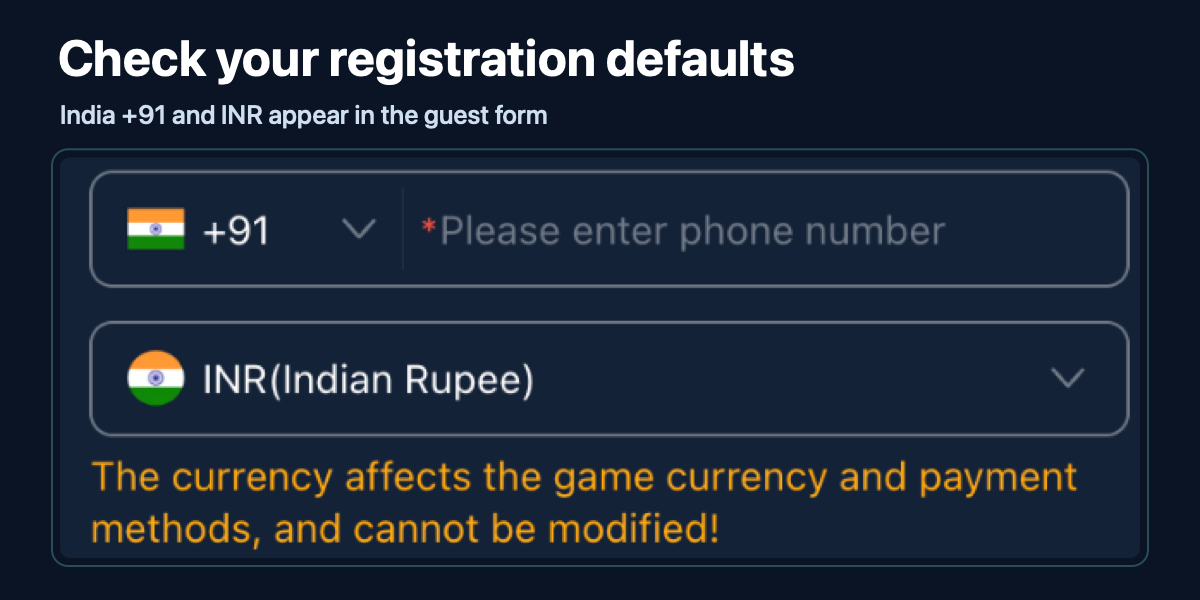
Select Register in the India lobby. The form displays +91 and INR and offers Password registration and Code register. Have a mobile number you can access ready.
Open the India registration form
Tap Register in the site header or bottom bar to open the India lobby, then select Register beside Login. If you already have an account, use Login Help to recover it.
Check +91, INR and the User Agreement
The form shows Indian Rupee and says the selected currency applies to games and payment methods and cannot be changed. Review the User Agreement and confirm the age requirement shown before submitting.
Register with a password
Choose Password registration, enter the requested mobile and account details, and set a unique password. Check the password-strength indicator and correct the field if the form shows an error.
Register with a code
Choose Code register when it appears and follow the prompt for your +91 phone number. Request and enter the SMS code on the platform, then review the remaining fields shown.
Referral code and Google option
The referral code is optional. If you have a code you want to use, enter it in the referral field. Choose the Google icon under Binding registration to link your Google account directly. Check the Google account shown before continuing.
Finish and use your new account
Review the form and complete registration. Once the platform confirms it, you can sign in and open games in the lobby. There is no separate verification step after registration. Later account or transaction checks are shown in the relevant platform flow.
Registration troubleshooting
- Phone or account already in use: return to Login and recover the existing account.
- Code missing: check +91, the phone number and the form’s resend prompt.
- Form does not continue: check required fields, the agreement and any error shown next to the input. The referral field can be left empty.
When to contact Customer Service
If the form repeatedly rejects valid details, send a crop of the message to Customer Service. Do not include the code, password or identity documents in an ordinary chat screenshot.